MX Player for Android is required to download the DTS codec (xda) setup as Custom codec in order to play the DTS video.
Ref:
MX Player Custom Codec With DTS Support [v1.7.14]
Nexus One 4.2.2
Flash Custom ROM basic steps for Nexus One OR Android Devices
- Nexus One Windows drivers //(Download) OR Android SDK
- ADB (Android Development Bridge) tools //(Download) OR Android SDK
- Class-10, 8-16G Micro SD, it's cheap now (HK Price) //Due to Nexus memory limited, fast SD used for additional apps storage
- Computer with Windows XP+ //seek tools for Linux, Mac, etc by yourself
- Backup applications list by aTrackDog(SD) track backup app (Play Store) //email the list out
- Backup APN, Call Log, SMS, and other kinds of setting, data and copy all stuff to desktop
- root the Nexus One OR Android device (xda) // Fastboot.exe download
- flash recovery
- Blackrose [System: 260 Cache: 8 Userdata: 168] // Nexus One only due small system size
- Download ROM to desktop [ [ROM/4.2.2] [Mar 02 2013] VJ CM10.1 | Jelly Bean 4.2.2 - v5.0 for N1]
- Boot into recovery by “power on" + “vol-down”
- Re-partition SD-Card in recovery with swap:128 - 256, sd-ext:1G+, FAT:rest (recommend swap:256M)
- mount USB storage in recovery, restore SD-Card by copy useful data back to SD-card
- Wipe all and flash ROM in recovery
- Connect desktop, start “adb shell”, type "a2sd install", type "Y N Y" and reboot
- Connect WI-Fi and sign in with Google Account, Apps should auto re-install from Plat Store
- Check a2sd diskspace, setting storage size, etc
- Go to Settings -> Launcher -> Homescreen -> Check "Stretch screens", Un-check "Scroll wallpaper", Check "Wallpaper quick render" //suggest by the developer
- Click Setting -> About phone -> Build Numbers 7 times for developer options
- Tweak (overclock, memory, windows scale, etc)
- Install apps (Play store)
- Enjoy and thanks AOSP, CM, Evervolv, AOKP and vijendrahs, this 4.2.2 ROM is smooth and nice for daily use :D
And video preview from Dima Kantargi
Nexus One running Android JB 4.2.1 CM10.1 v4.7 by VJ
Prerequisite
- Nexus One Windows drivers //(Download) OR Android SDK- ADB (Android Development Bridge) tools //(Download) OR Android SDK
- Class-10, 8-16G Micro SD, it's cheap now (HK Price) //Due to Nexus memory limited, fast SD used for additional apps storage
- Computer with Windows XP+ //seek tools for Linux, Mac, etc by yourself
Steps
- Backup applications list by aTrackDog(SD) track backup app (Play Store) //email the list out- Backup APN, Call Log, SMS, and other kinds of setting, data and copy all stuff to desktop
- root the Nexus One OR Android device (xda) // Fastboot.exe download
- flash recovery
- Blackrose [System: 260 Cache: 8 Userdata: 168] // Nexus One only due small system size
- Download ROM to desktop [ [ROM/4.2.2] [Mar 02 2013] VJ CM10.1 | Jelly Bean 4.2.2 - v5.0 for N1]
- Boot into recovery by “power on" + “vol-down”
- Re-partition SD-Card in recovery with swap:128 - 256, sd-ext:1G+, FAT:rest (recommend swap:256M)
- mount USB storage in recovery, restore SD-Card by copy useful data back to SD-card
- Wipe all and flash ROM in recovery
- Connect desktop, start “adb shell”, type "a2sd install", type "Y N Y" and reboot
- Connect WI-Fi and sign in with Google Account, Apps should auto re-install from Plat Store
- Check a2sd diskspace, setting storage size, etc
- Go to Settings -> Launcher -> Homescreen -> Check "Stretch screens", Un-check "Scroll wallpaper", Check "Wallpaper quick render" //suggest by the developer
- Click Setting -> About phone -> Build Numbers 7 times for developer options
- Tweak (overclock, memory, windows scale, etc)
- Install apps (Play store)
- Enjoy and thanks AOSP, CM, Evervolv, AOKP and vijendrahs, this 4.2.2 ROM is smooth and nice for daily use :D
And video preview from Dima Kantargi
Nexus One running Android JB 4.2.1 CM10.1 v4.7 by VJ
Android APK forensic
Android apps’ APK could be easily retrieved after mobile has been rooted, by using ADB, File Manager, email, etc.
After got the APK, it could uses dex2jar to work with the classes.dex to investigate the details of the Java codes.
How-to
1. Extract the classes.dex from the APK by WinRAR, 7Zip, etc.
2. use “dex2jar" to de-compile the classes.dex to the jar file.
Tools reference:
1. dex2jar - Tools to work with android .dex and java .class files.
# The developer fixed the problem immediately after the bug reported yesterday.
And here is the new build.
2. JAVA environment must be installed in which for dex2jar to work.
3. Java Decompiler
After got the APK, it could uses dex2jar to work with the classes.dex to investigate the details of the Java codes.
How-to
1. Extract the classes.dex from the APK by WinRAR, 7Zip, etc.
2. use “dex2jar" to de-compile the classes.dex to the jar file.
command: dj-dex2jar.bat classes.dex3. use Java Decompiler to examine the Java source.
![]() |
| classes-dex2jar.jar de-compliled from RMapsExt3.1.5 (Special make for China which based from RMaps) |
Tools reference:
1. dex2jar - Tools to work with android .dex and java .class files.
# The developer fixed the problem immediately after the bug reported yesterday.
And here is the new build.
2. JAVA environment must be installed in which for dex2jar to work.
3. Java Decompiler
ext2, ext3 and ext4 in Nexus One
Nexus One 改裝上 Evervolv Jellybean 的 nightly builds, 諗住把 sd 卡的 ext partition 換成 ext4,點知好不容易就 system crash,boot 返起無晒 sd-ext 內的 app, setting, etc.
要在 recovery fix ext partition,再 flash 過新 ROM, restore apps, 十級麻煩.
終於 Google 一下 ext2, ext3, ext4 的分別及用途.發現 ext3, ext4 係正,多左好多功能.不過用在 sd 等 flash 卡上.會增加 i/o 在 journalling 及增加 parallel 存取及多用戶情況的處理.
轉換在單機單用戶的 Android 上,反變成浪費資源既制肘.
早兩日開始更換為1G ext2 在 16G class 10 SD 卡上,給已成末代Nexus 最後一道甜點.期望能順利過渡,迎接下一隻 Android.
Android Jelly Bean 4.1.1 on Nexus One
Ref:
ext2 ext3 or ext4?
要在 recovery fix ext partition,再 flash 過新 ROM, restore apps, 十級麻煩.
終於 Google 一下 ext2, ext3, ext4 的分別及用途.發現 ext3, ext4 係正,多左好多功能.不過用在 sd 等 flash 卡上.會增加 i/o 在 journalling 及增加 parallel 存取及多用戶情況的處理.
轉換在單機單用戶的 Android 上,反變成浪費資源既制肘.
早兩日開始更換為1G ext2 在 16G class 10 SD 卡上,給已成末代Nexus 最後一道甜點.期望能順利過渡,迎接下一隻 Android.
Android Jelly Bean 4.1.1 on Nexus One
Ref:
ext2 ext3 or ext4?
ASUS Transformer Prime ADB driver not working with exclamation mark
For those would like to "root" the ASUS Transformer Prime in Windows, all we need is the ADB driver, but most of the Google results shouldn't help.
After tried How to Install Transformer Prime USB Drivers on Windows! and [ADB/FB/APX Driver] Universal Naked Driver Beta 0.5, Only the Portable Devices - MTP (Media Device) could be recognized.
After all, goto Support For Eee Pad Transformer Prime TF201 -> Utilities -> ASUS Sync V1.0.76, install it. The PC will be rebooted and the yellow Exclamation Mark will go away!
Have fun with the ADB working fine (^^
anr_history.txt and Low on space
Recently, it’s found that “Low on space” happened and even clear the storage, it’s still eat up the storage and “Low on space” appeared.
After checked, there have a file called anr_history.txt is grow up to 7X Mbytes which located at
/data/data/com.android.htcprofile
by using “du -sh *” at the folder /data/data.
Google it a lot & seems related to Dalvik but not much discussion found. As a result, working with below steps to clear the storage.
1. Backup using Nandroid.
2. Copy the anr_history.txt to /sdcard for restore backup when having problem.
Google it a lot & seems related to Dalvik but not much discussion found. As a result, working with below steps to clear the storage.
1. Backup using Nandroid.
2. Copy the anr_history.txt to /sdcard for restore backup when having problem.
cp anr_history.txt /sdcard
3. Clear the content of the anr_history.txt, "DON'T" rm it to avoid having file permission problem.
echo “ “ > anr_history.txt
4. Check the SD and phone storage
Storage restored to 8X Mbytes. Great!
Update:
ANR = Application Not Respondingusing find the anr_history - "find / -name anr_history.txt"
脹卜卜, 肥嘟嘟 鋰電池 + 手機電池膨脹,繼續使用會有何影響?
不經不覺,部 Hero 重度使用 15 個月, 再次 Cal 電也不濟 (Calibrate Battery) 況且, 跟機原裝電現在已變成脹卜卜, 肥嘟嘟.
星期六, 走進 298, shop 232 - Speedy Batteries 買 Momax x-level 電 ($110 discounted), 昨日長開 data connection & data sync, 晚上 9點還有+10%電量. 總萛有個不錯的交代.
有得換電就有這個好處, 不用特別付款買幾百元(每年) 的保養合約 (還有長長的 TOC) 或者 加錢換新機.
換左電之後, FroydVillain 已開始 1.72 的旅程, 依家用 1.6 已經不錯, 期望好快就有 Hero 搭上 Gingerbread 的新版本 ROM 發佈.
Ref:
手機電池膨脹,繼續使用會有何影響?
星期六, 走進 298, shop 232 - Speedy Batteries 買 Momax x-level 電 ($110 discounted), 昨日長開 data connection & data sync, 晚上 9點還有+10%電量. 總萛有個不錯的交代.
有得換電就有這個好處, 不用特別付款買幾百元(每年) 的保養合約 (還有長長的 TOC) 或者 加錢換新機.
換左電之後, FroydVillain 已開始 1.72 的旅程, 依家用 1.6 已經不錯, 期望好快就有 Hero 搭上 Gingerbread 的新版本 ROM 發佈.
Ref:
手機電池膨脹,繼續使用會有何影響?
Tweaks for Superb Battery Life in EVO
除左早前用過的電池校正方法外, 原來仲有好幾種方法來校正 Smartphone 的 li-ion 電.
Click - Tweaks for Superb Battery Life in EVO
Ref:
Nexus One 電量校正 - tEre-tErRiTOrY
Click - Tweaks for Superb Battery Life in EVO
Ref:
Nexus One 電量校正 - tEre-tErRiTOrY
Android - Offline 字典, Wordmate, 賽微隨身典 Cyberon Talking Dictionary
Android 常用的 offline 字典, 暫時比較好用的有 賽微隨身典, 有發聲功能, 始終係 crack 版, 未必支援全部 Android 的解像度. 手上的 Hero with FroydVillain v.1.1.1 and Tattoo 2.1 就無緣喇, 反而 N1 original 2.2 就ok.
賽微隨身典破解版 Cyberon Talking Dictionary
其次, 長做長有的 Wordmate, 此版已經有好耐歷史, 無發聲功能, 依然好好用. 字庫和 Stardict 共用, 可在 sourceforge 找, tar bal format, 用 RAR 可以解開. 或者此 blog 底有zip 版的常用字庫以供下載.
解壓後, 放在 /sdcard/wordmate 即可.
Ref:
Wordmate Instruction, Stardict 字庫
常用字庫
stardict-oxford-big5-2.4.zip, 牛津現代英漢雙解詞典, 8 MB
Comprehensive_English_English.zip, 朗道英英字典, 5.50 MB
langdao-ec-gb.zip, 朗道英漢字典, 9.78 MB
stardict-21shijishuangxiangcidian-big5-2.4.zip,21世紀英漢漢英雙向詞典, 12.9 MB
stardict-cdict-big5-2.4.zip, 漢語字典, 4.31 MB
stardict-jmdict-en-ja-2.4.zip, English to Japanese Dictionary, 3.93 MB
stardict-jmdict-ja-en-2.4.zip, Japanese to English Dictionary, 6.95 MB
賽微隨身典破解版 Cyberon Talking Dictionary
其次, 長做長有的 Wordmate, 此版已經有好耐歷史, 無發聲功能, 依然好好用. 字庫和 Stardict 共用, 可在 sourceforge 找, tar bal format, 用 RAR 可以解開. 或者此 blog 底有zip 版的常用字庫以供下載.
解壓後, 放在 /sdcard/wordmate 即可.
Ref:
Wordmate Instruction, Stardict 字庫
常用字庫
stardict-oxford-big5-2.4.zip, 牛津現代英漢雙解詞典, 8 MB
Comprehensive_English_English.zip, 朗道英英字典, 5.50 MB
langdao-ec-gb.zip, 朗道英漢字典, 9.78 MB
stardict-21shijishuangxiangcidian-big5-2.4.zip,21世紀英漢漢英雙向詞典, 12.9 MB
stardict-cdict-big5-2.4.zip, 漢語字典, 4.31 MB
stardict-jmdict-en-ja-2.4.zip, English to Japanese Dictionary, 3.93 MB
stardict-jmdict-ja-en-2.4.zip, Japanese to English Dictionary, 6.95 MB
Android - SPL, Fastboot, Recovery
當大家的 Android 手機開始陳舊, 跟不上時代步伐, 同時保養又好快到期. 睇怕只有出售僅有幾塊錢的"老拍檔" 或是 上 xda forum, 找找 (同病相連的) hacker 特制 ROM.
這裡有幅關於 SPL, Fastboot, Recovery 的關係圖. 雖然睇完都未必知有咩用. 當 flash (刷) 得多, 救機救的多. 第日睇返一定會明白箇中奧秘.
講開 ROM, FroydVillain 1.1.1 (Android Froyo 2.2 for Hero GSM) 真係幾順, 感覺良好.
quietly hopeless
Picture credit: 安卓網
這裡有幅關於 SPL, Fastboot, Recovery 的關係圖. 雖然睇完都未必知有咩用. 當 flash (刷) 得多, 救機救的多. 第日睇返一定會明白箇中奧秘.
講開 ROM, FroydVillain 1.1.1 (Android Froyo 2.2 for Hero GSM) 真係幾順, 感覺良好.
quietly hopeless
Picture credit: 安卓網
Android - Alarms, Notifications & Ringtones
想把心愛既音樂, 怪聲, 小朋友把聲當作 Android 的 Alarms, Notifications 同 Ringtones,
只需在 /sdcard 新增以下 folders, 把想要的 mp3 放入對應 folder 內就得.
Alarms
/sdcard/media/audio/alarms
Notifications/sdcard/media/audio/notifications
Ringtones
/sdcard/media/audio/ringtones
Photos credit:
ysl 的程式天堂
How to Root 2.1 Hero RUU - Android ROM
雖然 hTC Hero 最終成功 upgrade 左去 2.1 的 Eclair, 之不過, 相信各位用家都唔想停留在 2.1 的約束.
既然, hTC 清楚表明唔會支援 Hero 這類舊機, 孤兒囝只好靠自己.
早幾日終於出現新希望. 同時 2.2 Froyo ROM for GSM Hero 也誕生了.
Hero 2.1 的 official RUU 成功被 hack, 詳情請睇下面條 link, 成功 hack 了之後, 就可以刷 2.2 的 Hero custom ROM 喇.
新加:
FroydVillain 附有 terminal app, 打開後, 輸入 su, 之後輸入 reboot recovery, 就能夠進入 recovery mode, 這就方便 flash 新 ROM, backup image, etc.
Ref:
- RUU is the Rom Update Utility from HTC
- VillainROM wiki
- Hero 2.1 Ruu 告破
IP Cam Viewer - Android App
如果用開 IP Cam 來觀察家中小朋友, 傭工 或者 小偷, 這隻 IP Cam Viewer 絕對好用, 根據作者所講, 大部份 IP Cam, 或者 jpg 的 URL 都能應付自如.
若是未有 support 的 Cam, 還可以去作者的 forum 提出, 作者有時間就會更新. 有需要的, 不妨下載試試.
QR code
若是未有 support 的 Cam, 還可以去作者的 forum 提出, 作者有時間就會更新. 有需要的, 不妨下載試試.
QR code
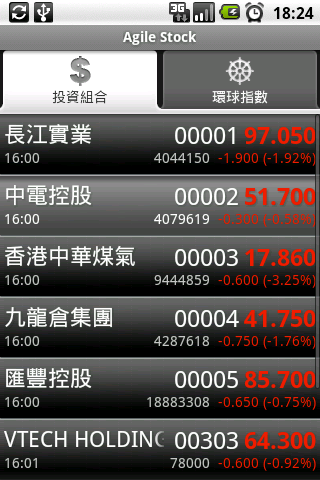
Agile Stock 下架了 - Android Apps
不幸地, 簡單, 方便, 快捷 的 Agile Stock 已經下架, 無法再在 Market 搵到.
雖然作者不再維護同修正, 同時在 Android 2.2 Fyoro 有幾百 % 的升降問題存在, 若還想使用, 用 Google search 一下, 應該唔難找回.
http://www.google.com.hk/search?a&q=AgileStock.apk
此外, 有另一方法, DelayNoMore股票報價網頁 (by Tere Wong) 作股票查詢, 也是不錯.
Ref:
Update (2010/05/27): 因應 HKEx 的要求,本軟件已由 Android Market 下架。
http://www.reality.hk/articles/2009/11/03/1205/
雖然作者不再維護同修正, 同時在 Android 2.2 Fyoro 有幾百 % 的升降問題存在, 若還想使用, 用 Google search 一下, 應該唔難找回.
http://www.google.com.hk/search?a&q=AgileStock.apk
此外, 有另一方法, DelayNoMore股票報價網頁 (by Tere Wong) 作股票查詢, 也是不錯.
Ref:
Update (2010/05/27): 因應 HKEx 的要求,本軟件已由 Android Market 下架。
http://www.reality.hk/articles/2009/11/03/1205/
App 2 SD (move apps to SD) - Android 2.2 Fyoro
Using this app can found installed apps which could use the "Move 2 SD" features in Fyoro. It's convenience & free!
App 2 SD (move apps to SD) by Sam Lu
Want porn? Go Android!
Want in-app Share? Go Android!
Want OS fragmentation? Go Android!
Want bigger / smaller screen? Go Android!
Want QWERT? Go Android!
Want ... . ? Go Android!
Want under controlled? Go Apple!
#Android
Want in-app Share? Go Android!
Want OS fragmentation? Go Android!
Want bigger / smaller screen? Go Android!
Want QWERT? Go Android!
Want ... . ? Go Android!
Want under controlled? Go Apple!
#Android
Android RMaps offline maps
整左好幾個適合 RMaps 用的 offline maps,放出黎大家用吧.全部都係 Google map,Zoom level 最大係 19,儲存在 Google doc.開放給下載.
詳細的 Rmaps 教學
http://blog.xuite.net/aaronliu0308/clutter/29658599
Update 20110611:
新版 Mobile Atlas Creator 1.9 已經唔再支援 Google Map, Yahoo Map 等 比較出名既地圖 source,各位有需要用舊版的話, 1.8 RC1 (1315),請 email 我取...
Hong Kong + Shenzhen (676M)
Bangkok (718M) --- updated at 20110808
Beijing (479M) <--Zoom Lv 有問題, 1 Apr, 2010 重制
Ming Tomb (明陵) (246M)
MacauZhuhai_GoogleMap (58M)
MacauZhuhai_MS_map (18M) - Zoom level 最大係 18
Updated: 20110227
Taichung 台中市 (516M)
Taipei 台北市 (586M)
Puli, Cingjing 埔里, 青境 (142M)
Updated: 20110403
Taipei 台北市 (572 MB)
Updated: 20130620
Phuket 泰國 布吉 (136MB)
MacauZhuhai_GoogleMap (58M)
MacauZhuhai_MS_map (18M) - Zoom level 最大係 18
Updated: 20110227
Taichung 台中市 (516M)
Taipei 台北市 (586M)
Puli, Cingjing 埔里, 青境 (142M)
Updated: 20110403
Taipei 台北市 (572 MB)
Updated: 20130620
Phuket 泰國 布吉 (136MB)
詳細的 Rmaps 教學
http://blog.xuite.net/aaronliu0308/clutter/29658599
Update 20110611:
新版 Mobile Atlas Creator 1.9 已經唔再支援 Google Map, Yahoo Map 等 比較出名既地圖 source,各位有需要用舊版的話, 1.8 RC1 (1315),請 email 我取...
推(動)去寫 Apps - Google Android Lab
真估不到,Google Android Lab 的全部出席者,每人也可帶走一部 Superphone.
在 Lab 上,除左講解當前 Market 形勢, Market 方向後, 另外再介紹兩種處理 Android application 的方式.
第一是 Thread,點樣通過 Main UI,同各自創建的 Thread去互相溝通 [IPC],其次,當遇上orientation change 時,application 會遇上什麼轉變.
第二是 Nexus One 的玄炫部份(Live wallpaper),N1 經過強悍的 Qualcomm Snagdragon 加持,背景行 services 己不再察覺會拖延 active application. 往後推出的 applications,能夠處理得更複雜,更全面.到其時,只會怕電池耗光.
這部 Nexus One 真是一個好好的 bonus,正好給老婆把 HTC Tattoo 打入冷宮.雖則 Tattoo 不錯,只可惜屏幕細...
當初,因為睇 Professional Android Application Development,對發展 app 產生興趣,既然收到 Google 厚禮,同時家中陳舊 desktop 已經轉身成為 Core i5 - 750,推 Android SDK 已經卓卓有餘.期望將來能抽多點時間,完成腦海中的 apps.
題外話,當日除左西方人仕,香港朋友,發覺仲有好多 內地朋友.是不是 OMS 下的種子?
| Rossi excited about his free Nexus One (Ryanne Lai @laihiu) |
在 Lab 上,除左講解當前 Market 形勢, Market 方向後, 另外再介紹兩種處理 Android application 的方式.
第一是 Thread,點樣通過 Main UI,同各自創建的 Thread去互相溝通 [IPC],其次,當遇上orientation change 時,application 會遇上什麼轉變.
第二是 Nexus One 的玄炫部份(Live wallpaper),N1 經過強悍的 Qualcomm Snagdragon 加持,背景行 services 己不再察覺會拖延 active application. 往後推出的 applications,能夠處理得更複雜,更全面.到其時,只會怕電池耗光.
這部 Nexus One 真是一個好好的 bonus,正好給老婆把 HTC Tattoo 打入冷宮.雖則 Tattoo 不錯,只可惜屏幕細...
當初,因為睇 Professional Android Application Development,對發展 app 產生興趣,既然收到 Google 厚禮,同時家中陳舊 desktop 已經轉身成為 Core i5 - 750,推 Android SDK 已經卓卓有餘.期望將來能抽多點時間,完成腦海中的 apps.
| ADL2010 HK 的 Super Star (Android Plush Bag) |
![]() |
| 會場一角 |
Google I/O - 開發者大會
有興趣看看未來 web 既世界,click 去 Mobile01 睇下丫.
Google I/O Keynote Day 1
More from Google.
Google I/O Keynote Day 2
Ref: Google I/O
訂閱:
文章 (Atom)